Functions
SDK Functions
These are functions used through the SDK Modding Menu.
Discord

A direct link to the HD2 Community Modding Discord.
Archive IDs

A direct link to the spreadsheet listing the archives for currently found game assets.
GitHub SDK Link

GitHub to the HD2 SDK releases.
Star Icon

Loads the base game archive 9ba626afa44a3aa3 into the SDK.
Avatar Icon

Imports the Helldiver player avatar armature rig into the scene.
Search Found Archives

Find and load the archive for the object input into the search bar.
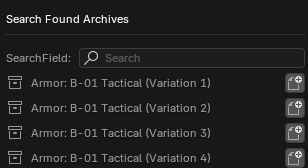
Unload Patches

Unloads all patches currently loaded in the SDK, including the base archive.
Archives

Foldout menu displaying all archives currently loaded in the SDK.
Manually Load Archives

Search the data folder for an archive to load into the SDK.
New Patch

Makes a new patch in the SDK. Will automatically load the base archive if it has not been loaded yet.
Write Patch

Creates a patch set in the data folder from the current modified objects in the SDK.
Export Patch

Exports the patch set to a specified location as a .zip file.
Unload Patches
Unloads all patch sets currently loaded in the SDK.
Rename Mod
Renames current patch set. Obsolete Feature.
Manually Load Patch
Loads patch set into the SDK.
Currently Modifed Objects Checkmark
Displays all modified objects in the current patch and hides all other objects.
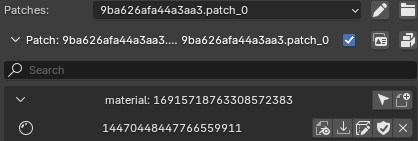
Save

Saves selected object into the current patch set.
Import

Imports selected object into the Blender scene.
Add to Patch

Adds selected object to patch
Remove from Patch

Clicking the shield icon will undo modifications to selected object, while clicking the X icon will remove the object from the patch entirely.
INFO
The X icon will only appear if the Currently Modifed Objects Checkmark is selected or if a different archive from the modified object is selected.
Show Material Editor

Displays the shader options for the selected material.
Right Click Functions
These are functions used when right clicking an object in the SDK or in the Blender scene.
Right Click Mesh
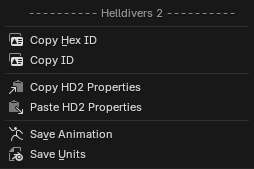
Copy HexID - Copies the HexID of the selected object
Copy ID - Copies the Numerical ID of the selected object
Copy HD2 Properties - Copies all the HD2 properties attached to the selected object
Paste HD2 Properties - Pasted previously copied HD2 properties to the selected object
Save Animation - Saves selected animations from select armatures
Save Units - Saves selected objects to current patch
Right Click Object in SDK Menu
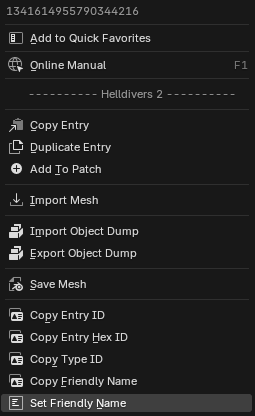
Copy Entry - Copies selected entry's name
Duplicate Entry - Duplicates select entry and pastes it into current patch
Add to Patch - Adds selected entry into current patch
Import - Imports selected entry into Blender scene
Import Object Dump - Imports object dump from user selected files
Export Object Dump - Exports object dump to user specified location
Save - Saves select entry into current patch
Copy Entry ID - Copy selected entry numerical ID
Copy Hex ID - Copy selected entry HexID
Copy Type ID - Copy selected entry Type ID IE: Material, texture, mesh, ECT.
Copy Friendly Name - Copy select entry internal name if applicable IE: assault_rifle
Set Friendly Name - Manually set name of entry